
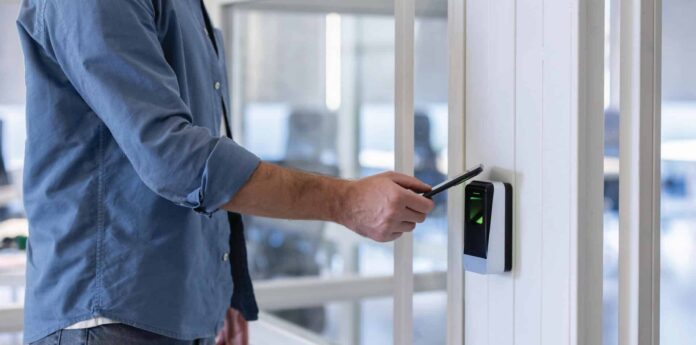
Access control has changed rapidly over the last decade. What was once a simple system built around plastic keycards and door readers has evolved into a connected, business-critical platform that directly affects security posture, tenant satisfaction, regulatory compliance, and daily operations.
For commercial property owners, facility managers, and multi-site operators, access control is no longer just about locking and unlocking doors. It is about managing people, risk, and movement in a way that supports how buildings are actually used today.
This guide is for commercial decision-makers evaluating access control modernization, with a specific focus on mobile credentials, touchless entry, and visitor management. It is designed as a high-level, practical resource to help you understand current capabilities, identify priorities, and plan a modernization strategy that aligns with operational and security goals.
What access control modernization really means
Access control modernization is often misunderstood as a hardware refresh. While new readers and controllers may be part of the project, true modernization goes far beyond swapping equipment.
Modern access control represents a shift from isolated, door-by-door hardware to an integrated system that supports visibility, flexibility, and accountability across the entire property.
A modernized access control system should be able to:
- Verify identity with greater confidence and consistency
- Provide detailed audit trails and reporting
- Support role-based and time-based access rules
- Scale across multiple doors, floors, and sites
- Integrate with other building and security systems
- Improve the experience for employees, tenants, vendors, and visitors
For commercial properties, modernization typically includes one or more of the following upgrades:
Mobile access control using smartphones as credentials
- Touchless or low-touch entry at key doors
- Visitor management systems with digital check-in and pre-registration
- Centralized administration for multi-door or multi-site environments
- Improved reporting, compliance documentation, and incident review tools
Rather than treating access control as a standalone system, modernization positions it as part of a broader operational and security ecosystem.
Why commercial properties are upgrading now
Most commercial properties do not modernize access control because it is trendy. They do it because existing systems no longer align with how their buildings operate or the level of accountability expected today.
Common triggers for modernization include:
- Lost, shared, or unmanaged credentials with limited accountability
- High administrative burden for issuing, replacing, and tracking badges
- Tenant expectations for mobile access and smoother visitor experiences
- Inadequate audit trails for compliance, investigations, or insurance events
- Difficulty managing access across multiple sites or mixed-use spaces
- Aging controllers and readers that are difficult or costly to service
Access control modernization is also closely tied to business continuity. When staffing changes occur, vendors need to be removed quickly, or a property is responding to a security incident, the ability to update access in minutes rather than days can significantly reduce exposure.
In many cases, modernization is driven by operational friction rather than a single security event. Systems that slow down onboarding, create front-desk bottlenecks, or require constant manual work eventually become obstacles rather than safeguards.
Mobile access control: what it is and why it continues to grow
Mobile access control replaces or supplements physical credentials with digital credentials stored on a smartphone. Authorized users unlock doors using a secure mobile application and compatible readers, typically through Bluetooth, NFC, or encrypted token exchange.
Mobile credentials have moved from early adoption to mainstream use in commercial environments because they align with how people already operate day to day.
Benefits of mobile credentials in commercial settings
Mobile access control offers several practical advantages:
- User convenience: People are far less likely to forget or misplace a phone than a badge.
- Faster onboarding and offboarding: Credentials can be issued or revoked remotely without physical handoffs.
- Reduced replacement costs: Fewer lost badges mean fewer reprints and less administrative work.
- Granular access control: Permissions can be assigned by role, location, and schedule.
- Improved auditability: Systems generate detailed logs showing who accessed which door and when.
Mobile access is particularly valuable in environments such as:
- Multi-tenant office buildings
- Medical and healthcare facilities
- Warehouses and logistics operations
- Corporate offices and administrative spaces
- Property management groups overseeing multiple locations
In these environments, the speed and flexibility of mobile credential management can significantly reduce administrative overhead while improving control.
Mobile access control models
Most modern systems support several credential models:
- Mobile-only deployments: No physical badges are issued.
- Hybrid deployments: Mobile credentials are used alongside cards or fobs.
- Temporary mobile credentials: Time-limited access for contractors, vendors, or short-term staff.
Hybrid models are common in commercial properties because they accommodate a range of users and risk profiles. For example, employees may use mobile credentials, while certain roles or contingency scenarios still rely on physical badges.
Security considerations for mobile access
Mobile access can be highly secure when implemented properly. Security depends less on the concept of mobile credentials and more on how the system is designed and managed.
Important questions to address include:
- How are credentials encrypted and stored on devices?
- What happens if a phone is lost or stolen?
- Can multi-factor authentication be enforced for the mobile app?
- Are access rules restricted by time, location, or device status?
- How are administrators authenticated and logged?
When configured correctly, mobile access often improves security by reducing credential sharing and enabling immediate revocation when risk changes.
Touchless access control: reducing friction without sacrificing control
Touchless access control focuses on minimizing physical contact while improving traffic flow at doors. In commercial properties, touchless entry can also encourage proper credential use and reduce unsafe behaviors such as tailgating.
Touchless access may include:
- Low-touch presentation of a phone or credential near a reader
- Hands-free unlocking based on Bluetooth proximity
- Motion-enabled or wave-to-open mechanisms in controlled scenarios
Where touchless access provides the most value
Touchless access is especially useful in:
- High-traffic lobbies and main entrances
- Common areas where hygiene is a concern
- Healthcare or lab environments where staff wear gloves
- Warehouses where employees carry equipment
- Tenant suites with frequent in-and-out movement
In these locations, reducing friction improves both user experience and throughput without compromising oversight.
Addressing security concerns
A common misconception is that touchless access is inherently less secure. In reality, security depends on configuration and policy.
Effective touchless deployments typically include:
- Clearly defined proximity rules
- Anti-passback or usage policies where appropriate
- Door position monitoring and forced-door alerts
- Camera coverage at critical entrances
Touchless access should be viewed as a user-experience enhancement that must be supported by thoughtful controls and monitoring.
Visitor management: closing a common security gap
Many commercial buildings still rely on manual sign-in sheets or informal visitor processes. While common, these approaches provide limited accountability and a poor record of who is actually in the building.
A modern visitor management system transforms how guests, vendors, and contractors enter and move through a property.
Core features of modern visitor management
Most systems include:
- Pre-registration and invitations from hosts
- Digital check-in with identity confirmation
- Automated host notifications
- Visitor badging with photos or QR codes
- Watchlists and rule-based restrictions
- Comprehensive audit logs
Why visitor management matters
For commercial properties, visitor management improves:
- Accountability: Clear records of who is on site and why
- Efficiency: Faster lobby processing and fewer bottlenecks
- Professionalism: A smoother, more organized arrival experience
- Risk control: Vendors and contractors limited to approved areas and time windows
Visitor management is particularly important for multi-tenant buildings, facilities with frequent vendor access, and properties with sensitive or regulated areas.
Credential management: the foundation of effective access control
Modern access control is only as strong as the processes used to manage credentials throughout their lifecycle.
Strong credential management includes:
- Role-based access for employees, tenants, vendors, and visitors
- Time-based schedules aligned with operational needs
- Rapid revocation when roles change or contracts end
- Clear approval workflows and administrative controls
- Regular audits to remove outdated permissions
For many commercial properties, this is where modernization delivers the greatest security improvement. Reducing stale credentials and unmanaged access dramatically lowers exposure without changing physical infrastructure.
Integrations that increase long-term value
Access control becomes more powerful when integrated with other systems. Common integrations include:
- Video surveillance for event-based review
- Intrusion systems tied to schedules and occupancy
- Elevator controls for floor-level permissions
- Intercoms for remote entry approval
- HR or tenant directories for streamlined onboarding
Integrations should be planned intentionally, starting with the doors and scenarios that carry the highest risk or traffic volume.
Cloud, on-prem, and hybrid systems
Modern access control platforms may be cloud-managed, on-premises, or hybrid.
At a high level:
- Cloud-managed systems simplify multi-site administration and updates
- On-prem systems provide local control in certain environments
- Hybrid systems balance local operation with centralized visibility
Rather than focusing on architecture alone, commercial buyers should evaluate how each model supports operational needs, reporting requirements, and administrative workflows.
Planning an access control modernization project
Successful modernization begins with clarity and phased execution.
Step one: define objectives
Clear goals may include:
- Reducing unauthorized entry at main entrances
- Improving tenant experience with mobile credentials
- Replacing unsupported hardware
- Improving visitor processing and accountability
- Centralizing access management across properties
Step two: assess doors, users, and risk
Understanding which doors matter most and who uses them allows modernization to focus on real exposure rather than blanket upgrades.
Step three: implement in phases
Phased rollouts reduce disruption and deliver value sooner. Many projects begin with main entrances and high-risk areas before expanding to suites and amenities.
Step four: support adoption
Training, clear policies, and simple onboarding are essential to ensure systems are used correctly and consistently.
Common mistakes to avoid
- Replacing hardware without improving credential policies
- Delaying visitor management until after an incident
- Treating every door equally rather than prioritizing risk
- Overcomplicating early phases of deployment
- Choosing platforms that cannot scale or integrate
Questions to ask an access control provider
When evaluating providers, commercial buyers should ask:
- Do you support mobile credentials and hybrid deployments?
- What touchless options are appropriate for our entrances?
- How does visitor management work in multi-tenant environments?
- Can access be scheduled and approved by role?
- What reporting and audit tools are available?
- How do integrations with cameras and alarms function?
- What does installation, service, and long-term support include?
Conclusion: modernization supports both security and experience
Access control modernization is one of the most practical upgrades a commercial property can make. Mobile credentials and touchless entry improve daily flow, while visitor management and stronger credential policies improve accountability and oversight.
The most effective modernization strategies begin with a site-specific assessment, focus on high-risk and high-traffic areas, and roll out in manageable phases. The result is a system that supports how buildings operate today while reducing long-term risk.
Frequently asked questions
What is mobile access control?
Mobile access control uses a smartphone as a secure credential to unlock doors.
Is touchless access secure?
Yes, when configured with appropriate proximity rules, monitoring, and audit logs.
Do all doors need to be upgraded at once?
No. Most commercial properties modernize in phases.
Can visitor management support multiple tenants?
Yes. Many systems support tenant-specific hosts within a centralized lobby workflow.

